Stud Layout Calculator
Get the mark for every stud on your wall plates, measured from one end of the wall, so the sheathing and drywall edges land on studs.
Wall details
Openings (doors and windows)
Results
For a 10 ft wall at 16" on center, measured from the start end: the first layout mark is 15-1/4", the next marks follow every 16", and the far end stud is at 118-1/2". Every mark is listed below; draw the line at each one and set the stud on the far side of it.
First layout mark from the wall start
15-1/4"
This is a plain wall run: end studs plus layout studs on one module.
The last bay is whatever is left before the far end stud and is often short. Leave it short; respreading the bays moves every sheet edge off the studs.
| # | Stud | Mark (in) | Mark (ft-in) |
|---|---|---|---|
| 1 | End stud | 0" | 0' 0" |
| 2 | Layout stud | 15-1/4" | 1' 3-1/4" |
| 3 | Layout stud | 31-1/4" | 2' 7-1/4" |
| 4 | Layout stud | 47-1/4" | 3' 11-1/4" |
| 5 | Layout stud | 63-1/4" | 5' 3-1/4" |
| 6 | Layout stud | 79-1/4" | 6' 7-1/4" |
| 7 | Layout stud | 95-1/4" | 7' 11-1/4" |
| 8 | Layout stud | 111-1/4" | 9' 3-1/4" |
| 9 | End stud | 118-1/2" | 9' 10-1/2" |
How this works
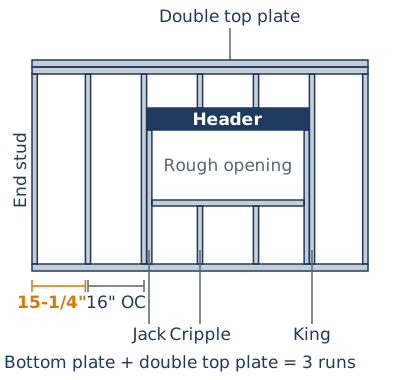
Every mark is measured from the start of the wall and is the near edge of a stud, with the stud on the far side of the line. The start end stud is at 0 and the far end stud sits flush with the other end, at the wall length minus one stud thickness. The first field mark is the on-center spacing minus half a stud: at 16" spacing that is 15-1/4", at 24" it is 23-1/4". That puts the first stud's centre on the spacing and every later centre on a multiple of it, and because a 48" sheet is a whole number of 16" and 24" bays, each sheet edge lands on the middle of a stud. Later marks follow at the full spacing until a stud would run past the far end stud. A corner at either end adds 2 studs side by side just inside that end stud. Each door or window rough opening gets a jack stud against each side (two per side once the opening is wider than 6 ft, following the stud calculator's sourced wide-opening rule) and a king stud outside the jacks. Where a layout mark collides with an end, corner, king or jack stud, the layout stud is dropped and the fixed stud takes its place, so the plate never gets two studs in one spot. A layout mark that falls inside a rough opening stays on layout as a cripple. Openings whose framing would collide with each other, a corner, or a wall end are reported as invalid rather than shifted, because moving a king stud is a framing decision, not arithmetic. Marks are shown in inches and in feet and inches, rounded to the nearest 1/16", and in millimetres when the metric toggle is on. The calculation itself runs in metres internally, so switching units does not change any mark.
| Spacing | First mark (spacing − half a stud) | Later marks |
|---|---|---|
| 16" on center | 15-1/4" | 31-1/4", 47-1/4", 63-1/4", … |
| 24" on center | 23-1/4" | 47-1/4", 71-1/4", 95-1/4", … |
Stud spacing options: International Residential Code (IRC), Table R602.3(5), published by the International Code Council; stud thickness of 1-1/2" for a dry, surfaced 2×4 or 2×6: USDA Forest Service Wood Handbook, Table 6-6 (American Standard Lumber sizes), checked 2026-10-30.
Worked example
A 10 ft wall framed at 16" on center, no corners, no openings. The wall is 120" long. The start end stud is at 0. The first mark is 16 − 1.5 ÷ 2 = 15-1/4", then every 16": 31-1/4", 47-1/4", 63-1/4", 79-1/4", 95-1/4" and 111-1/4". The next mark, 127-1/4", is past the wall. The far end stud sits flush with the end, at 120 − 1.5 = 118-1/2". The last bay, from 111-1/4" to 118-1/2", is shorter than the rest, which is normal. Sheet edges at 48" and 96" fall on the centres of the studs marked at 47-1/4" and 95-1/4".
A second example: the same wall with a 36" window
Same 10 ft wall at 16" on center, with a 36" rough opening starting 40" from the wall start. A 36" opening is under the 6 ft wide-opening threshold, so it gets one jack per side. Left side: jack at 40 − 1.5 = 38-1/2", king at 37". Right side: the opening ends at 76", so the jack is at 76" and the king at 77-1/2". The layout marks 47-1/4" and 63-1/4" fall inside the opening, so they become cripples (above the header, and below the sill for a window). 15-1/4", 31-1/4", 79-1/4", 95-1/4" and 111-1/4" clear the king and jack studs and stay as full studs, and the end stud is again at 118-1/2".
Common mistakes
Marking stud centres instead of stud edges
Some framers mark stud centres, others mark stud edges. Mixing the two, by measuring a centre mark and then setting the stud beside the line, puts every stud 3/4" off, and the first sheet edge lands on the edge of a stud instead of its middle. Use one convention for the whole plate. This calculator gives edge marks (15-1/4", then every 16"), with the stud on the far side of each line.
Starting the layout from the wrong end
The layout starts at the end where the first sheet will go, and every mark is measured from there. Start from the other end and the module lands somewhere else on the wall. Decide which end is the start before marking, and write an arrow on the plate.
Dropping the layout studs inside an opening
Studs that fall inside a door or window opening still mark where the cripples go above the header and below the sill. Shifting those cripples to the middle of the opening looks tidy, but then the drywall above the header has no stud where its edge falls. Cut cripples to the layout marks.
Keeping a layout stud that overlaps a king or jack
When a layout mark lands within a stud thickness of a king or jack, two studs would share the same space. Set the king or jack and leave the layout stud out. The calculator's mark list already drops it, so the plate has one stud in each spot.
Laying out the plates separately
Marking the top and bottom plates one at a time almost always puts a stud out of plumb somewhere along the wall. Clamp or tack the plates together, square each mark across both, then separate them for nailing.
When this calculator's layout stops applying
- Butting walls and inside corners: when the sheet goods start on another wall's face, measure from that face; subtract the other wall's thickness from every mark here.
- Stud spacing other than 16" or 24": the spacing data this page uses lists only 16" and 24", so other modules (such as 19.2") are not offered.
- Double-stud and staggered-stud walls: each row of studs has its own layout. Run each row on its own plate.
- Shear walls and engineered walls: hold-downs, extra boundary studs and nailing come from the engineer's drawings, which override these marks.
- Header and opening sizing: the rough opening width comes from the door or window manufacturer and the header size from your plans or the IRC header tables. This page only places the studs.
- Openings within a few inches of a corner: the corner and the king usually share studs in real framing. The calculator does not merge them; it reports the layout as invalid until the opening clears the corner studs.
- Rake (gable-end) walls: the marks along the bottom plate still apply, but every stud is a different length under the sloped top plate.
- Metric framing at 400 mm or 600 mm: the metric toggle converts the US inch spacings to millimetres; it does not offer metric-market modules.
FAQ
Why is the first mark 15-1/4" and not 16"?
Because the mark is the stud's edge, not its centre. A stud is 1-1/2" thick, so its centre sits 3/4" past the line you draw; marking 15-1/4" from the wall end puts the first stud's centre at exactly 16", and every later centre on a multiple of 16". That is what makes a 48" sheet edge land on the middle of a stud instead of on its edge, with half a stud of bearing for the next sheet.
Which side of the line does the stud go on?
On the far side, away from the wall start. Draw the line at each mark, then an X just past it; the stud covers the X. Keep that habit for every mark on the plate, including kings, jacks and cripples, so nobody nails a stud on the wrong side of a line and shifts the layout by a full stud thickness.
Where do I hook the tape?
On the end of the plate where the sheathing or drywall will start. Hook it once and pull every mark from that same end without moving the tape. Measuring each bay separately, stud to stud, adds a small error at every bay and the last sheets drift off the studs.
What if my wall butts into another wall instead of starting at a corner?
Lay out from the point where the sheet goods start, not from the end of this plate. If the sheathing starts on the outside face of the wall this one butts into, that face is your zero: subtract that wall's thickness from every mark this calculator gives, or hook the tape on that face and transfer the marks directly. The spacing between marks does not change.
Should the top plate and bottom plate get the same marks?
Yes. Tack the top plate and bottom plate together edge to edge, ends flush, and square every mark across both at once. Separate layouts on each plate are the usual reason studs end up out of plumb or a sheet edge misses a stud at one end.
What happens to layout studs that fall inside a door or window opening?
They stay on layout as cripples, above the header for doors and windows and below the sill for windows, at the same marks the full studs would have used. That way the drywall and sheathing above and below the opening still break on the same centres as the rest of the wall. A layout stud that lands where a king or jack goes is left out, because the king or jack takes its place.
Why do some openings get two jack studs on each side?
Rough openings wider than 6 ft get a doubled jack on each side here, following the stud calculator's wide-opening rule taken from typical IRC header-span practice. The second jack moves the king out by one more stud thickness, and the marks reflect it. Header size and the exact jack count for a given span come from your plans or the IRC header tables; this page does not size headers.
Where do the corner studs go?
With "corner" switched on for a wall end, the calculator marks 2 studs side by side just inside the end stud, the common three-stud corner. If your corner detail spaces them out, turns one flat, or uses drywall clips instead, move or drop those 2 marks; the field marks still run from the wall end and do not change.
Can I switch from 16" to 24" partway along a wall?
Not without breaking the module. Sheet edges are placed on a single module from one end, so a change in spacing partway through means sheets that no longer break on studs past that point. Pick one spacing per wall from the code table for that wall's role and lay the whole run out with it.
Does the last bay have to be a full spacing?
No. The end stud sits flush with the far end of the wall wherever that falls, so the last bay is whatever is left over and is often narrower than the rest. That is normal. Do not spread the difference across the wall; every other bay stays on the module so the sheets keep landing on studs.